
Create Dependent Views
Views
Autodesk® Revit® add-in for batch creating dependent views from existing views and automatically assigning them to selected Scope Boxes.
Overview
- Create Dependent Views generates dependent views in bulk across multiple parent views and Scope Boxes in a single operation - replacing what would otherwise be a repetitive manual process for large multi-sector projects.
- Select any number of parent views and Scope Boxes independently. The tool creates one dependent view per Scope Box for each selected parent view and automatically assigns each dependent view to its corresponding Scope Box.
- Dependent views are named using the pattern: [Parent View Name] - [Scope Box Name]. The separator string is configurable, and there is an option to convert the resulting name to uppercase. If a dependent view with the same name already exists, creation is skipped.
Features
Select any number of parent views and Scope Boxes independently
Creates one dependent view per Scope Box for each selected parent view
Automatic Scope Box assignment for each created dependent view
Configurable name separator between parent view name and Scope Box name
Option to convert resulting view name to uppercase
Skips creation if a dependent view with the same name already exists
Known Limitations
- Only works with views that support dependent views in Revit
- Scope Box must exist in the model before running the tool
Screenshots
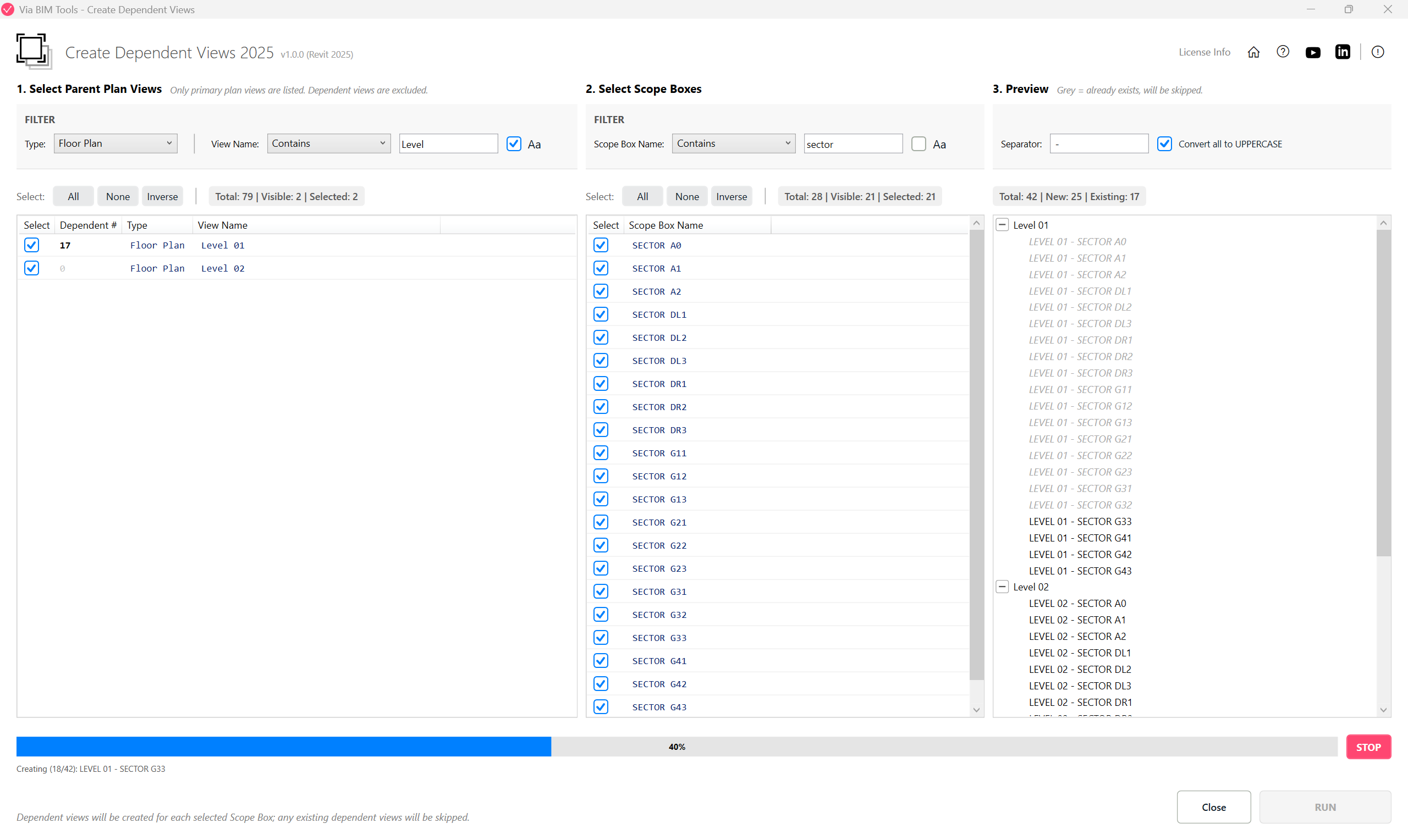
Select parent views and Scope Boxes to batch-create dependent views
Part of
Via BIM Tools Bundle17 tools
Version1.0.0
Revit2024, 2025, 2026, 2027
PlatformWindows
Also in the bundle
Scope Box ManagerCopy Scope Boxes From LinkReassign Scope Boxes To Views
Create Dependent Views
Place Views On SheetsBatch Rename ViewsBatch Rename SheetsCopy View Markers From LinkAlign Views On SheetsLinks SelectorPlan Region SnooperMEP Level MapperManage Revit UnitsLayers ManagerRoom 3D TagsRoom 3D VolumesRoom Space Cleanup