Place Views On Sheets
Sheets
Autodesk® Revit® add-in for batch placing views onto sheets by pairing them according to their selection order, with advanced filtering options for both views and sheets.
Overview
- Place Views On Sheets lets you batch place views onto sheets by matching selection order across both lists - view #1 goes to sheet #1, view #2 to sheet #2, and so on.
- Browse all views and sheets in two independent lists. Select items in the desired order - each receives an order number reflecting the sequence of clicks. Deselecting an item automatically reorders the remaining selection. If the number of selected views and sheets differ, unmatched items are skipped.
- Views can be filtered by Type and by name using Contains, Starts With, Ends With, or RegEx matching. Sheets can be filtered by Sheet Number and Sheet Name using the same matching options, with a configurable AND/OR operator between the two conditions.
Features
Browse all views and sheets in two independent filterable lists
Selection order pairing - view #1 placed on sheet #1, view #2 on sheet #2
Automatic reordering when items are deselected
Filter views by Type and name (Contains, Starts With, Ends With, RegEx)
Filter sheets by Sheet Number and Sheet Name with AND/OR operator
Unmatched items are skipped if view and sheet counts differ
Known Limitations
- Views already placed on a sheet cannot be placed again on a different sheet without first removing them
- Viewport position on the sheet is set to the default center placement
Screenshots
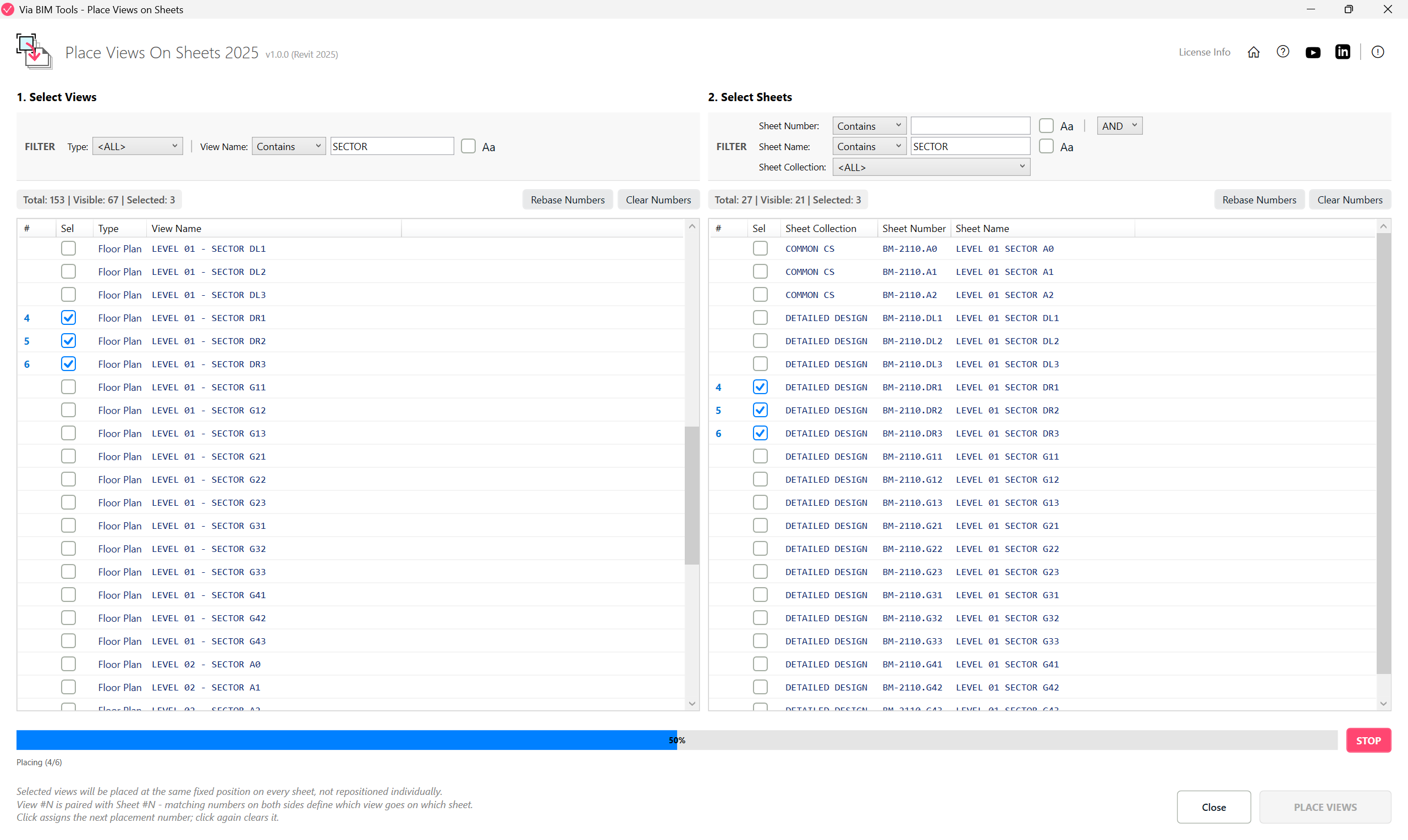
Select views and sheets in matching order to place them in one batch
Part of
Via BIM Tools Bundle17 tools
Version1.0.0
Revit2024, 2025, 2026, 2027
PlatformWindows
Also in the bundle
Scope Box ManagerCopy Scope Boxes From LinkReassign Scope Boxes To ViewsCreate Dependent Views
Place Views On Sheets
Batch Rename ViewsBatch Rename SheetsCopy View Markers From LinkAlign Views On SheetsLinks SelectorPlan Region SnooperMEP Level MapperManage Revit UnitsLayers ManagerRoom 3D TagsRoom 3D VolumesRoom Space Cleanup